Canvas ePortfolios (Legacy) - Exporting ePortfolios (Legacy)
This article explains how to export Canvas ePortfolios (Legacy) to HTML files to save on personal devices.
NOTE: ePortfolios will be retired on December 30, 2026. It is highly recommended that you export all your ePortfolios so you do not lose them.
Opening ePortfolios (Legacy)
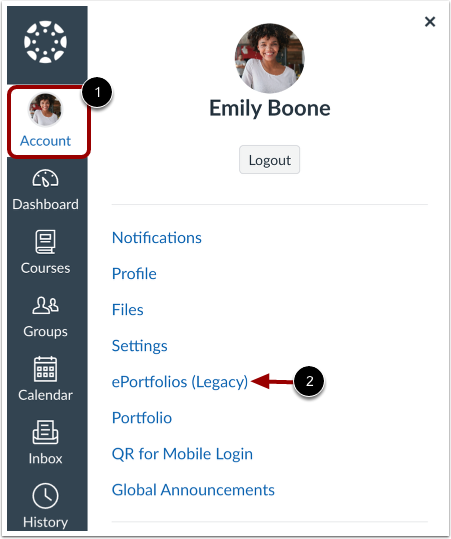
In Global Navigation, select Account and then select ePortfolio (Legacy).
Opening Desired ePortfolio for Export
Select the title of the ePortfolio you wish to export.

Downloading ePortfolio
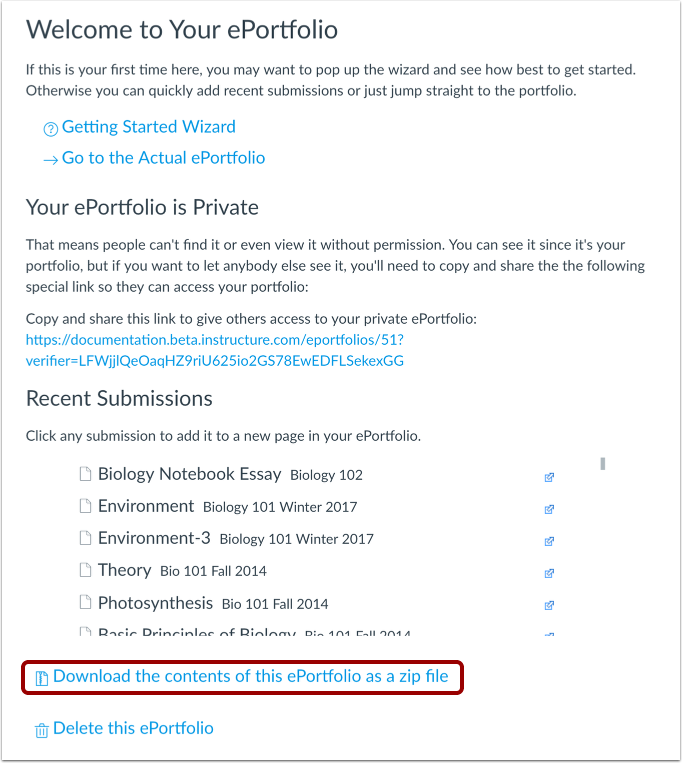
Select Download the contents of this ePortfolio as a zip file at the bottom of the page to download your ePortfolio.